Site builders · Source-available · Next.js + TypeScript

PageKit — everything you’d build around GrapesJS before you can ship

A production Next.js app around the open-source GrapesJS core: auth, multi-tenant projects, page storage, publishing, custom domains, lead capture, checkout and a plugin loader. Sold as source. Self-hosted. Yours to modify.

  • Pre-release · early access
  • GrapesJS 0.23 core
  • Next.js 15
  • TypeScript strict
  • PostgreSQL 16
  • Self-hosted
  • One-time licence

Early birdFirst 20 buyers get Agency at the Developer price — and lifetime updates.

The parts you were about to write.

A self-hosted landing page builder and micro-ecommerce app, built as a real Next.js application rather than a demo wired to an editor.

Editor

GrapesJS, properly wrapped

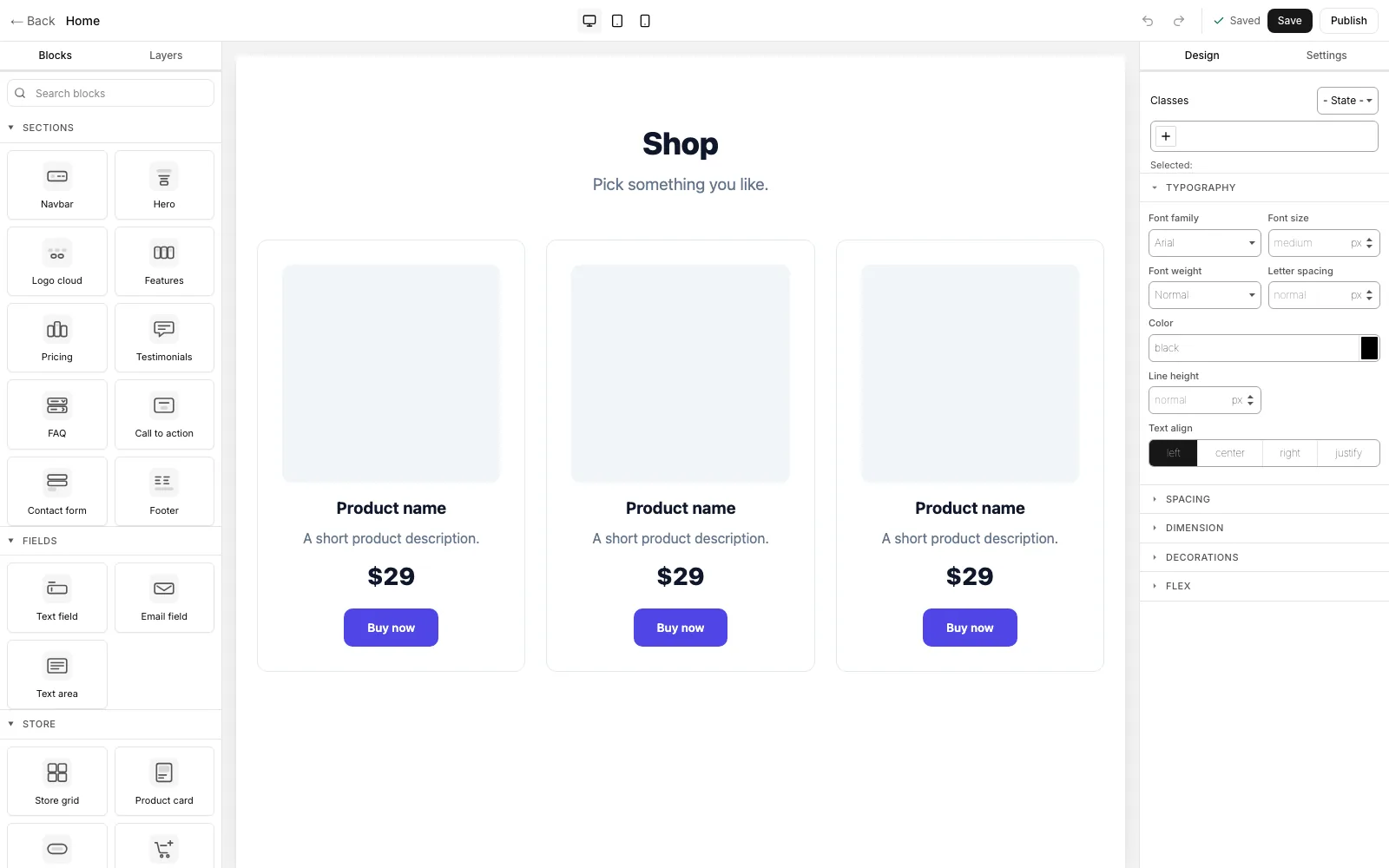
The open-source core with editor chrome that ships as source: block palette with search, layer tree, style manager, traits, device switching, and autosave guarded by an optimistic version token so two tabs can't silently overwrite each other.

Publish

Publish & custom domains

Publishing renders to a cached publication row that visitors hit without ever loading the editor bundle. Wildcard subdomains through middleware, plus custom domains with Caddy on-demand TLS validated against your own domain table.

SEO

SEO that scores

Per-page title, description, canonical, OG image generation, and a per-tenant sitemap.xml and robots.txt. Pages carrying JSON-LD emit it into the published document. Measured at 100/98/100/91 on Lighthouse.

Leads

Forms & lead capture

A form block with a field builder in the trait panel, honeypot plus optional Turnstile or hCaptcha, email and webhook notification on submit, and a leads inbox with CSV export.

Commerce

Micro-ecommerce

Products, cart and checkout behind one payment adapter. An offline test provider is the default so you can evaluate without keys; Stripe and PayPal drop in with your own credentials. Orders inbox and confirmation emails included.

Plugins

Plugin loader + marketplace

A Zod-validated manifest, ESM plugins registered before project load, semver range checks against the installed GrapesJS, and an in-admin gjs.market browser with one-click install. Two plugins ship bundled; the catalogue endpoint is configurable.

Growth

A/B tests & popups

Weighted variant serving with impression and conversion tracking and a declared winner, plus exit-intent and timed popups. Both are ordinary blocks and screens — no separate service to run.

Teams

Roles & approvals

Workspaces with owner, editor and viewer roles, email invitations with expiring tokens, a last-owner guard, and an opt-in review gate: editors submit, an owner approves, then it publishes.

Business

White-label & licensing

Rebrand the admin for your clients, and an offline Ed25519 licence check that degrades to a dismissible notice. A vendor outage never blocks the dashboard and never touches a published page.

What lands in the ZIP.

Full source, the operational scaffolding to run it, and the tests that prove it works. No compiled blobs, no phone-home requirement.

Application

  • Full TypeScript source, no obfuscation or compiled blobs
  • 23 database tables across 11 Drizzle migrations
  • 12 API route handlers and server actions throughout
  • 19 editor blocks in four categories
  • Six custom GrapesJS component types

Adapters

  • Storage — local filesystem (default) or S3-compatible
  • Email — SMTP (default), Resend or Postmark
  • Payments — offline test provider (default), Stripe or PayPal
  • Each behind one interface: swap by implementing it

Operations

  • docker-compose.yml — Postgres, app and Caddy
  • Caddyfile with on-demand TLS wired to a validation endpoint
  • .env.example and a guided first-run setup screen
  • Seed data so the first boot is not an empty canvas
  • make dist — reproducible, checksummed distribution ZIP

Developer kit

  • create-pagekit-plugin scaffold CLI
  • 12 Playwright end-to-end specs and 10 unit suites
  • INSTALL.md covering both deploy targets
  • LICENSES.md listing all 16 runtime dependencies

What you need to run it.

Two deploy targets, both supported on day one: docker compose up on a plain VPS, or Vercel with managed Postgres.

RuntimeNode.js 20 or newer
DatabasePostgreSQL 16
HostA VPS with Docker, or Vercel + managed Postgres
Memory~1 GB RAM for the primary Docker path
DNSA wildcard record, for subdomain routing

Not shared hosting. Shared hosting will not work. Next.js needs a Node runtime — we would rather say so here than sell you a refund.

The things developers actually ask.

Is this a SaaS I subscribe to?

No. PageKit is sold as source under a one-time licence. You deploy it on your own infrastructure and, on the SaaS tier, can run it as your own product. We host nothing for you.

Which GrapesJS does it use?

The open-source grapesjs core only, currently 0.23.5. Never the commercial Studio SDK, whose per-domain licence cannot be redistributed to you. All the editor chrome is built on the core API and ships in the source you receive.

Where does it run?

A plain VPS via docker compose — Postgres, the app and a Caddy reverse proxy — or Vercel with managed Postgres. Both are documented and supported. Shared hosting will not work, because Next.js needs a Node runtime.

Can I resell it or charge my own users?

The Agency tier covers up to ten client projects and includes white-label admin branding. The SaaS / Unlimited tier lets you run your own hosted product and charge end-users, with priority support. The Developer tier is one production project.

How do updates work?

Twelve months of updates are included with every tier; renew afterwards at 40% of the licence price per year. Because you self-host, you download and upgrade on your own schedule. Updates are never force-applied to a running install.

What happens if your licence server goes down?

Nothing. The licence check verifies an Ed25519-signed token offline and has a long grace period. A failure degrades to a dismissible notice in the admin panel — it never blocks the dashboard and never touches a published page. Test it; that is the intended behaviour.

Do I need Stripe or PayPal keys to evaluate it?

No. An offline test payment provider is the default, so the full cart and checkout flow runs on a laptop with no accounts and no network. Stripe and PayPal are drop-in once you add your own credentials.

What state is the product in right now?

Version 0.1.0, pre-release. The editor, publishing, domains, leads, ecommerce, the plugin loader, A/B tests, popups, team roles, approvals and white-label are all built and covered by tests. Multi-language pages and AI copy generation are on the roadmap and are not written yet. Joining the waitlist is how you get the source first.

Counted, not claimed

What’s actually in the box.

These are repository counts, not marketing rounding. Run them yourself against the source you receive.

19
Editor blocks
Across four categories — sections, form fields, store, growth.
23
Database tables
Eleven checked-in Drizzle migrations, applied on boot.
22
Test files
Twelve Playwright end-to-end specs and ten unit suites.
0
GPL dependencies
Sixteen runtime packages, every one permissively licensed.

Not a mockup

Real screenshots.

The gallery above is drawn in CSS so it stays in step with the product. Everything below is a capture of the running application, untouched. Open any of them full screen to read the detail.

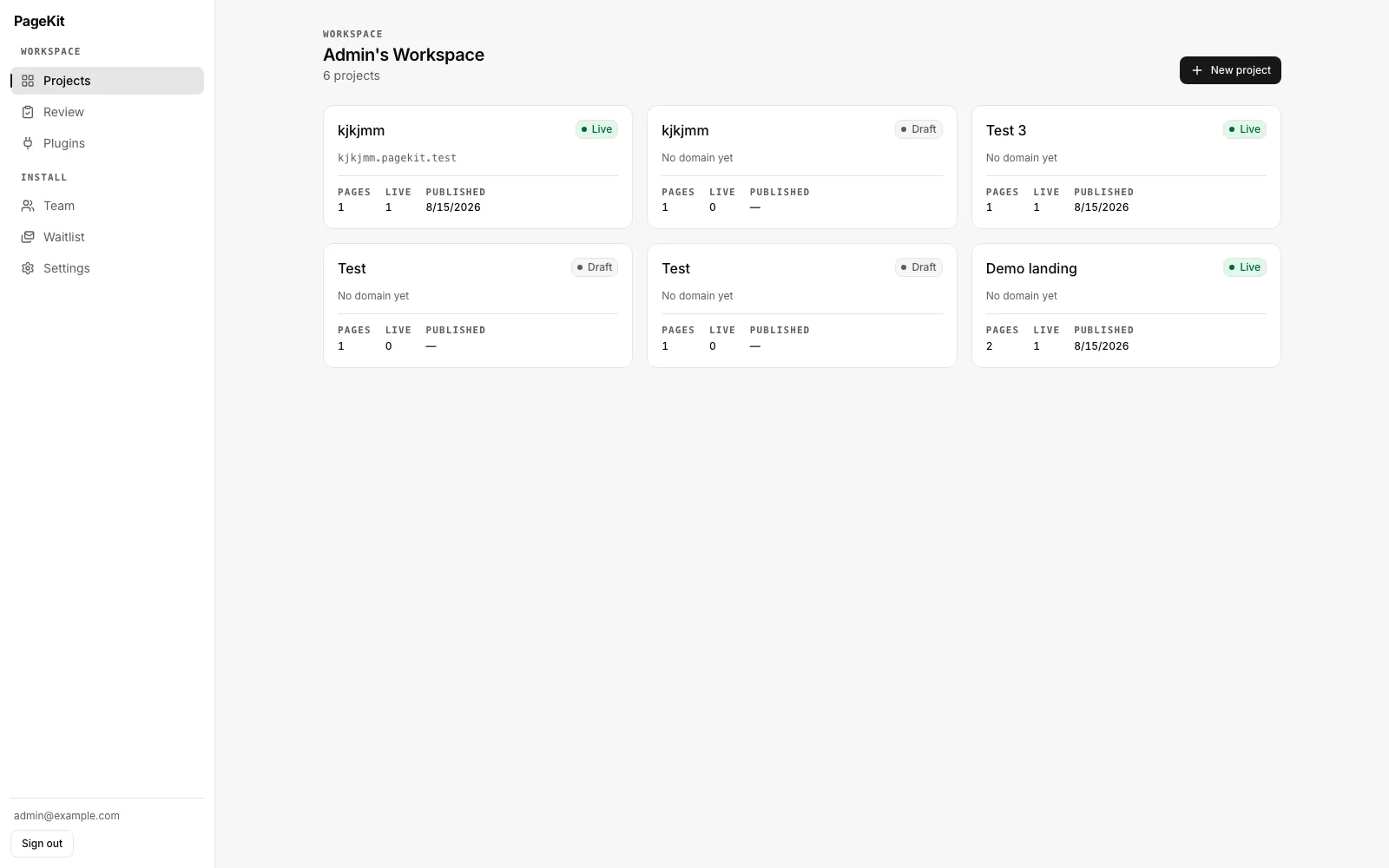
The PageKit dashboard listing six projects as cards, each showing live or draft status, its domain, and page, live and published counts.
Multi-tenant projectsOne workspace holds many projects, and each carries its own pages, domain and publish state — live or draft, page count, live count, last publish date. This is the part most GrapesJS integrations stop short of: the editor is the easy half, tenancy is the half that takes a month.
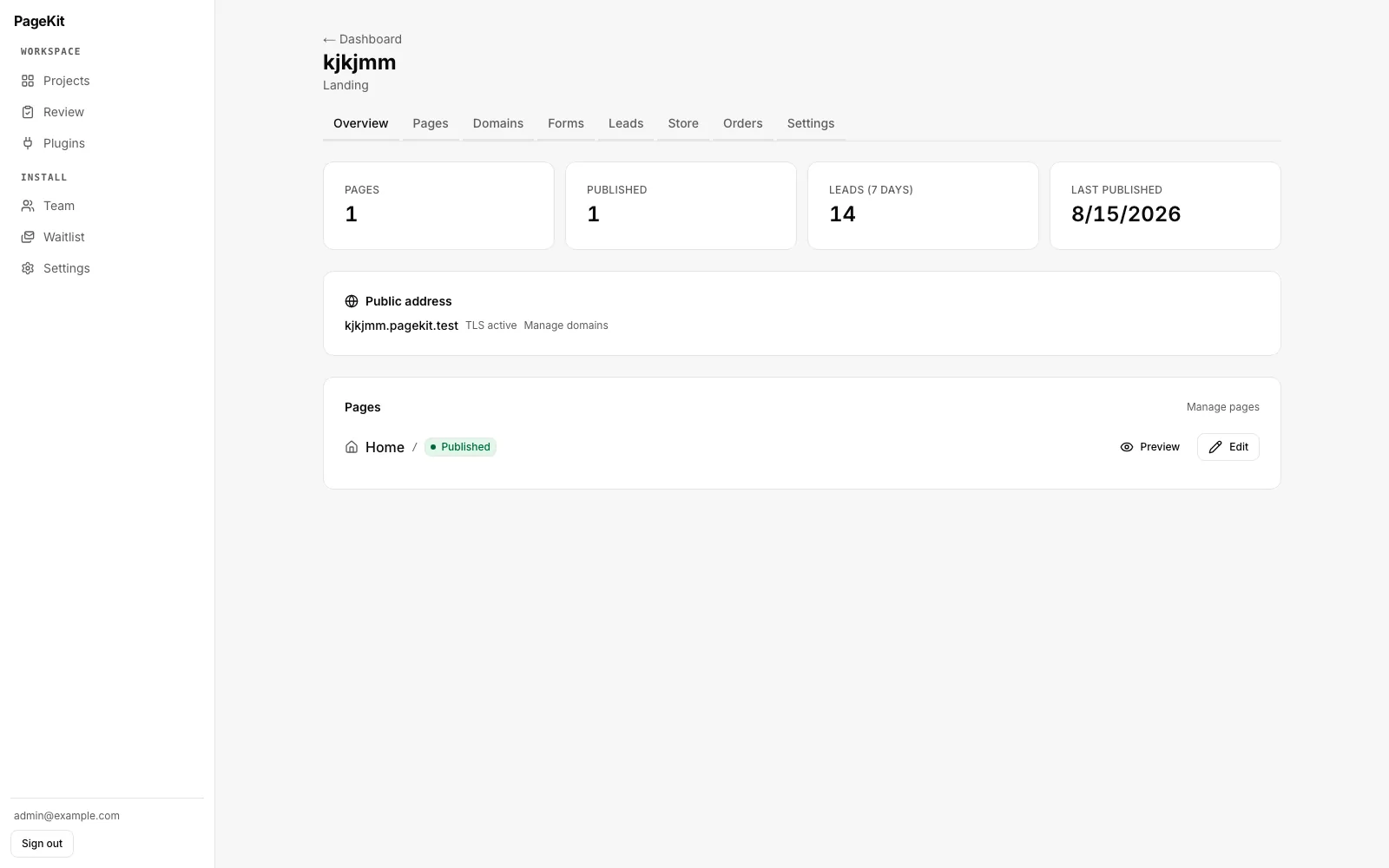
A PageKit project overview with tabs for Overview, Pages, Domains, Forms, Leads, Store, Orders and Settings; stat tiles for pages, published, leads and last published; the public address with TLS active; and the page list.
A project, end to endEight tabs — Overview, Pages, Domains, Forms, Leads, Store, Orders, Settings — and each one is built, not stubbed. The public address shows TLS already active: subdomains route through a wildcard record and certificates are issued on demand, so a new project is reachable over HTTPS without a deploy.
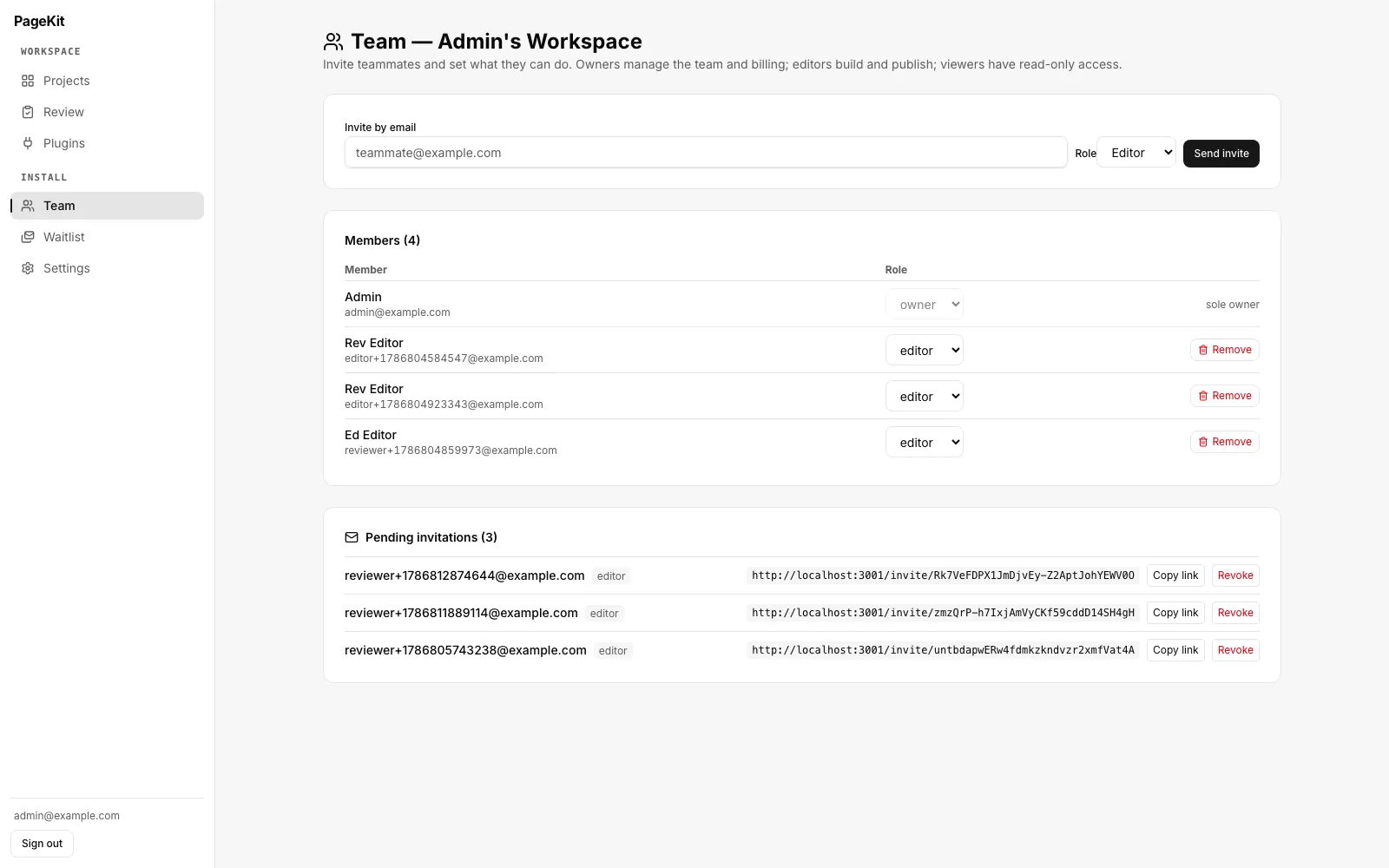
The PageKit team screen showing an invite-by-email form with a role selector, a members table with per-member role dropdowns, and a list of pending invitations with copyable invite links.
Team roles and invitationsInvite by email, assign owner, editor or viewer, and change a role later from the members table. Pending invitations stay listed with copyable links you can revoke. The last owner cannot be demoted or removed — the kind of guard you only remember to write after locking yourself out once.
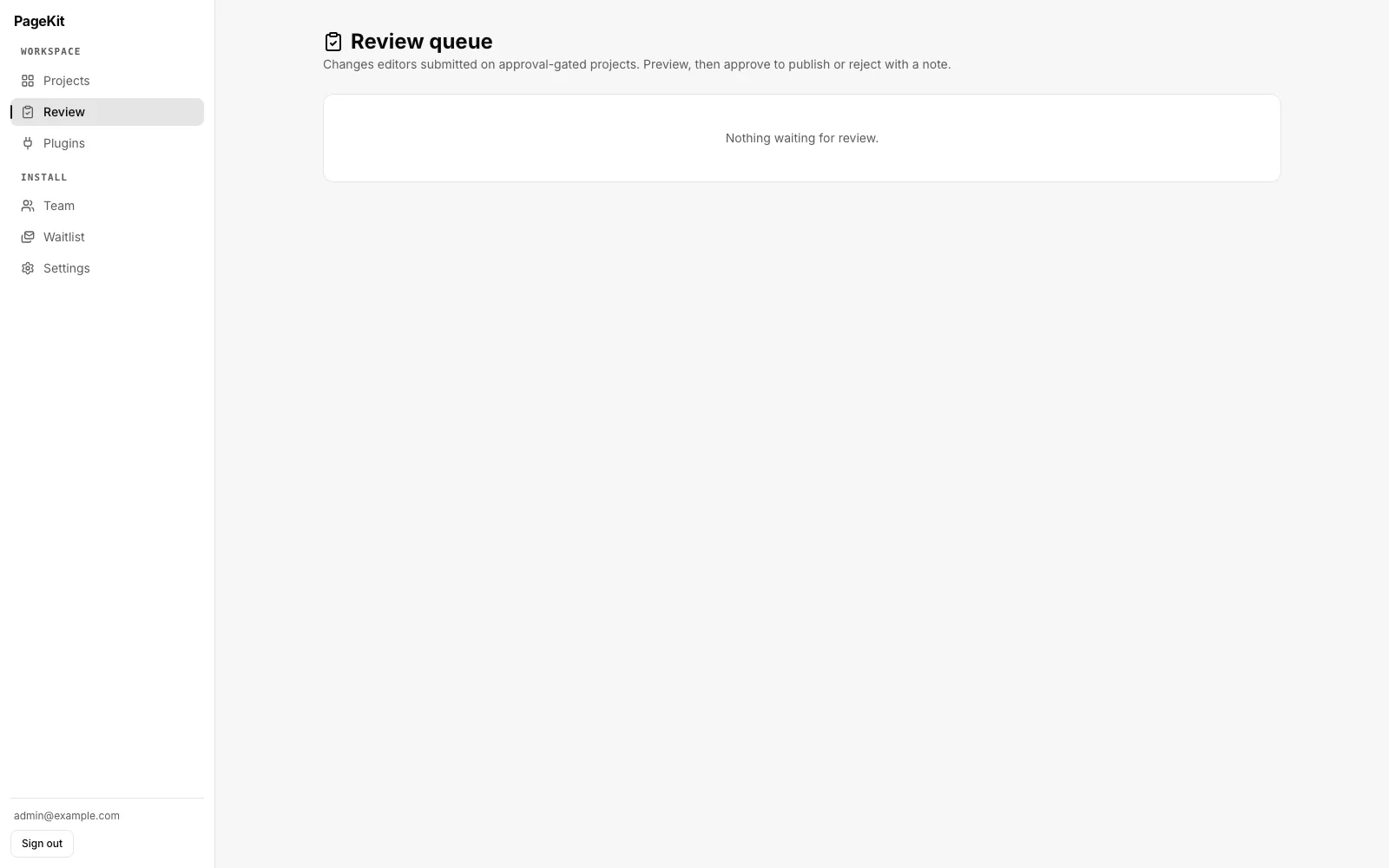
The PageKit review queue, empty, explaining that it holds changes editors submitted on approval-gated projects for preview, approval or rejection with a note.
An approval gateMark a project approval-gated and editors can no longer publish directly: their changes land here, where an owner previews the result and then approves it live or rejects it with a note. This is what makes the builder safe to hand to a client's marketing team.
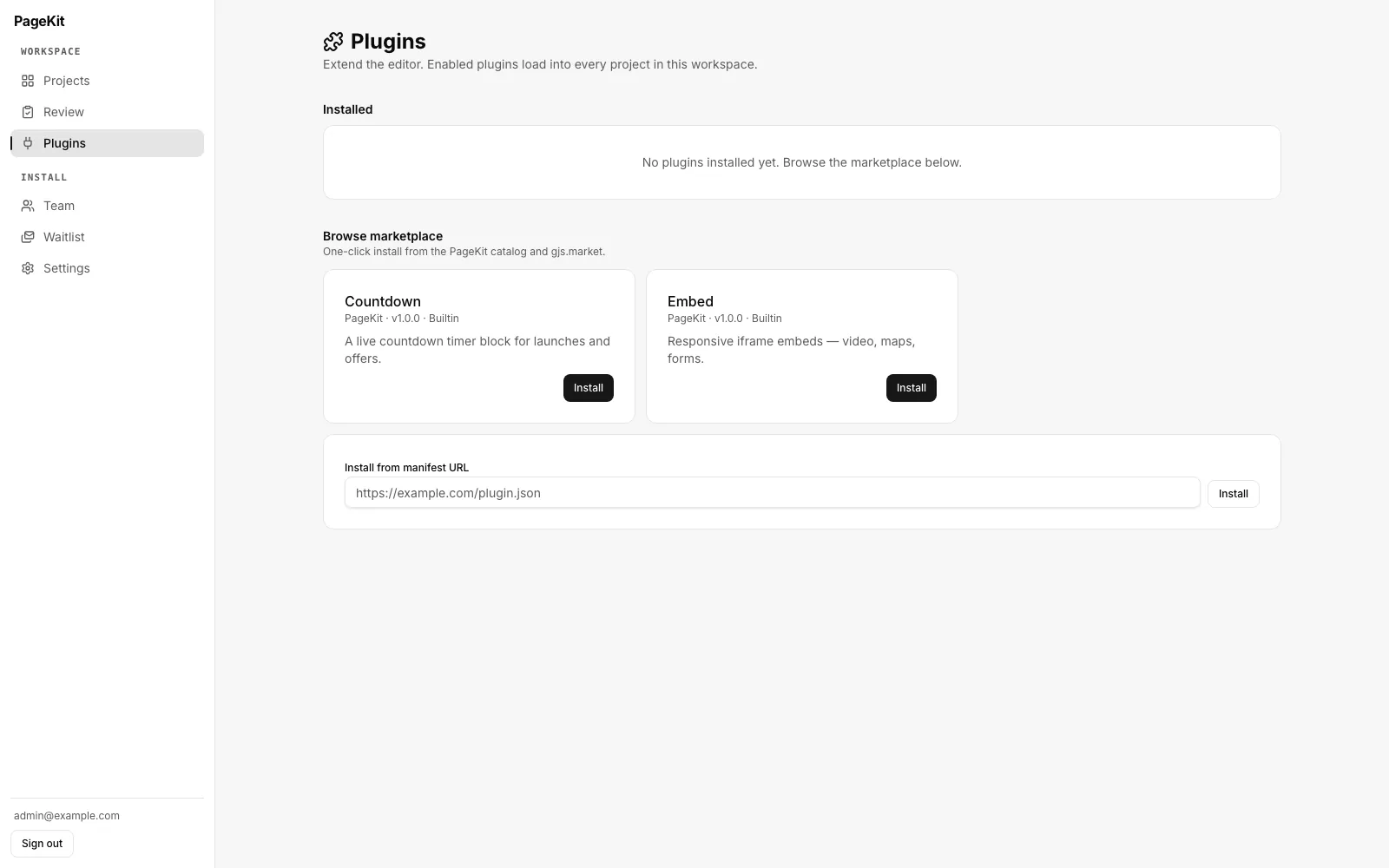
The PageKit plugins screen with an empty installed list, a marketplace showing the Countdown and Embed plugins with install buttons, and a field to install from a manifest URL.
A plugin loader, not a plugin listInstall from the bundled catalogue or from any manifest URL, and enabled plugins load into every project in the workspace. A scaffold CLI generates a new one, so the install ships with a way to extend it rather than a fork-and-patch instruction.
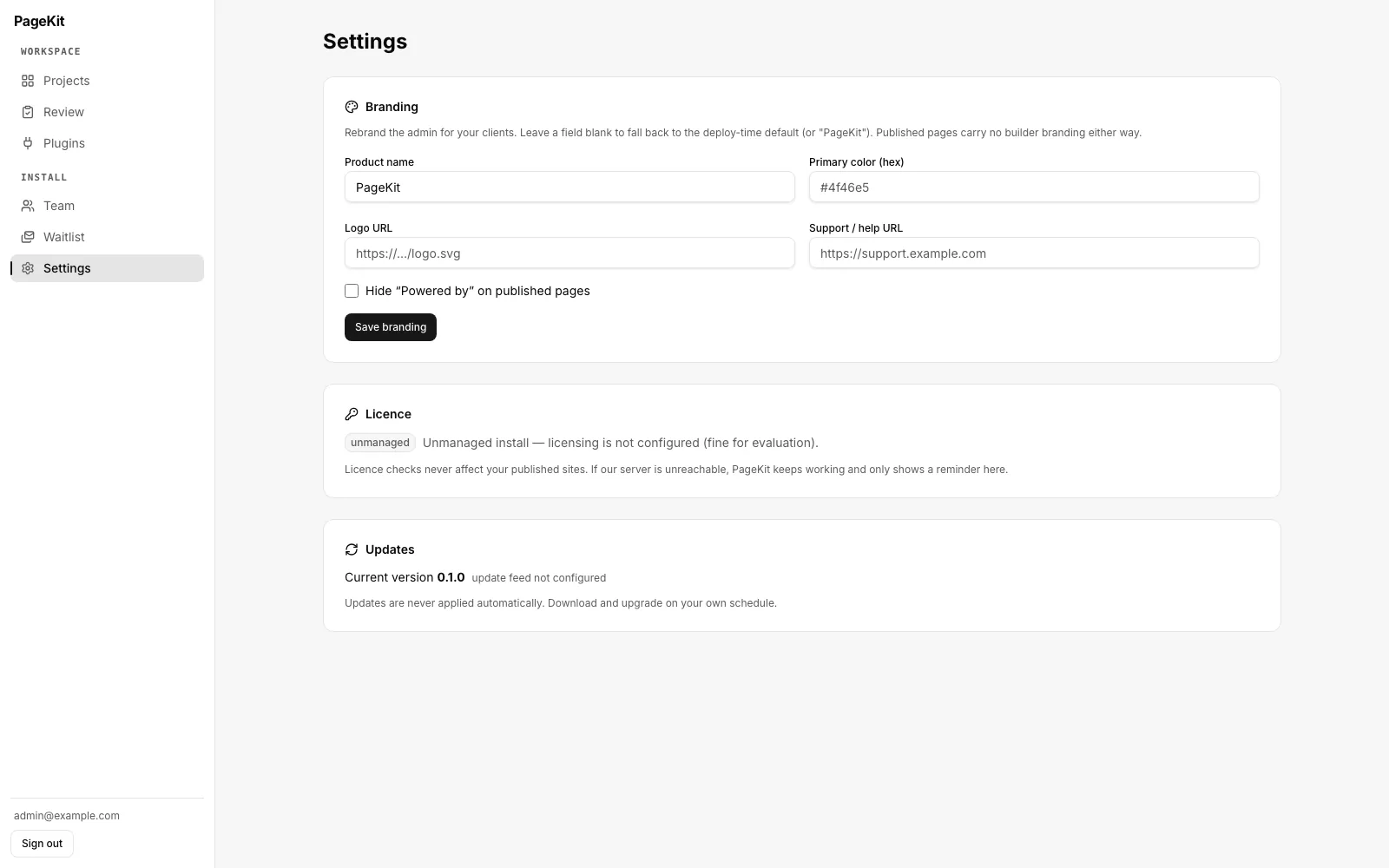
PageKit settings showing white-label branding fields for product name, primary colour, logo and support URL, a licence panel reading unmanaged install, and an updates panel showing version 0.1.0.
White-label, licensing, updatesRename the product, set the primary colour, swap the logo, point support at your own help desk and hide the “Powered by” line — published pages carry no builder branding either way. Licence checks never touch published sites, and updates are never applied automatically: you download and upgrade on your own schedule.

Hard-won

Four things that break a GrapesJS integration — and what we did about each.

If you have integrated GrapesJS before, you have met at least one of these. They are the reason a weekend prototype takes a month to make production-ready.

01

Project state is not the export

getProjectData() returns what restores an editing session. getHtml() and getCss() produce what you publish. Store the wrong one and you either ship editor scaffolding to visitors or hand your users a page they can no longer edit.

Two separate stores: pages.project_data holds the session, a publications row holds the rendered artifact. Published pages are served from the second and never touch the editor code path.

02

The canvas is an iframe

Fonts, CSS resets and any runtime library the rendered content needs must be injected into the frame. Adding them to the host page does nothing at all, which reads as a styling bug and gets debugged in the wrong file for an afternoon.

Everything the canvas needs goes through the editor's canvas.styles and canvas.scripts config, so what you see while editing is what the published document actually loads.

03

Component script is a serialized string

It executes inside the canvas frame and cannot close over the surrounding scope. A script referencing an imported symbol type-checks cleanly and throws at runtime — invisible until a user drags that component onto a page.

Every custom component passes its dependencies through script-props. The rule is enforced in review rather than discovered in production.

04

Register custom types before loading content

Content referencing a type that isn't registered yet quietly degrades to plain elements and permanently loses its behaviour for that session. Nothing errors. The page just gets worse every time it is opened.

The plugin loader resolves and registers a project's plugins before the load path runs, and refuses version-incompatible plugins loudly instead of failing silently inside the canvas.

Where it sits

A GrapesJS SaaS boilerplate, not another builder script.

The comparison that matters is not against other page builders. It is against the four weeks you were about to spend building this.

CapabilityPageKitA $55 builder scriptStudio SDKBuild it yourself
StackNext.js 15 · TypeScript strictTypically PHP 7Your app plus a vendor SDKWhatever you already run
Editor licenceOSS core, redistributableVaries, often unstatedPer-domain, not redistributableYour choice to make
Multi-tenant + custom domainsWildcard subdomains, on-demand TLSRarely, and rarely wellNot in scope — you build itRoughly a fortnight
Publish pipeline separate from the editorCached publications tableUsually renders through the editorYour responsibilityEasy to get subtly wrong
Automated tests12 E2E specs, 10 unit suitesAlmost never anyNot applicableTime you would rather spend elsewhere
Source yours to modifyFull, unobfuscatedUsuallySDK is a closed dependencyBy definition
Time to a published pageOne docker compose upHours of setup, then hopeDays, once you wire the restWeeks, honestly

Extend it

Your install ships with a plugin catalogue.

The plugin loader is a first-class part of the product, not an afterthought — and the gjs.market storefront is built into the admin, so extending an install does not mean forking it.

  1. Browse from inside the admin. A full screen, not a link in a footer.
  2. Install in one click. The manifest is validated and the semver range checked against your GrapesJS before anything loads.
  3. Registered before project load. So components never silently degrade to plain elements.
  4. Write your own. npm run create-plugin scaffolds one, and the same loader takes it from any URL.

No surprises

What’s built, and what isn’t.

Current state as of August 2026, version 0.1.0. We would rather you read this now than discover it after buying.

Shipped and covered by tests

  • Editor coreAuth, workspaces, projects and pages. GrapesJS mounted once, custom chrome, asset manager with client-side resize, autosave with version tokens.
  • Publish pipelineCached publications, hostname routing, wildcard subdomains, custom domains with on-demand TLS, per-page SEO, sitemap and robots.
  • Leads & formsField builder in traits, honeypot and captcha, email and webhook notification, leads inbox, CSV export.
  • EcommerceProducts, cart, checkout behind a payment adapter with an offline default, orders inbox, confirmation emails.
  • Plugin loaderTyped manifest, semver compatibility checks, in-admin marketplace, scaffold CLI, two bundled plugins.
  • A/B testing & popupsWeighted variant serving, impression and conversion tracking, declared winners, exit-intent and timed popups.
  • Teams & approvalsOwner, editor and viewer roles, email invitations, last-owner guard, opt-in review gate before publishing.
  • White-label & licensingAdmin rebranding, published-credit control, offline Ed25519 licence verification that degrades to a notice.

Not written yet

  • Multi-language pagesPer-locale page variants and a language switcher block. Designed, not written — there is no i18n code in the repository today.
  • AI copy generationSection and copy generation against your own Anthropic key. Not written; no AI dependency ships in the current source.

Early access

Get the source before it goes on sale.

One email when it ships, the early-bird bonus, and the public roadmap. Nothing else — no drip campaign, unsubscribe any time.

One email at launch. No spam, no drip campaign, unsubscribe anytime.

From $199 onceGet early access